|
|
Regular Price: | $95.00 |
Business Edition Buy Now Download |
| Our Price: | $95.00 $76.00 20% OFF | ||
| Discount: | -$19.00 | ||
| Sales for: | Global *USD$ is default, select other currencies at the order page | ||
| Coupon Code: | When you click "Buy Now" the coupon is added to your cart automatically | ||
|
Shipping:
|
Send Register Code by E-mail, that containing the download URL (Free)
More shipping requirement, please see in order page |
|
|
| 100% Purchase Secure & 30 Days Money Back Guarantee! |
|
||


System Requirements:
| Platforms: | Windows XP, Windows Vista, Windows 7, Windows 8 (32 bits or 64 bits) |
| Processor: | 800 MHz Intel, AMD CPU or above |
| RAM: | 512 MB or above |
| Disk Space: | 200 MB and above free space |
| Language: | English |
The "Corporate" license allows you to run multiple businesses from within the same program and allows other users within the organization to access data.
The "Business" license has all "Corporate" license features except multiple user or web access support.
We offer volume discount prices for this product editions
|
Save money by purchasing multiple license with the coupon codes as shown below: |
|||||
| Product | Our Price | Licenses | |||
| Inventoria Business Edition |
$95.00 $76.00 | All Corporate Edition features without multiple user or web access support | Discount -$19.00 | Buy Try | |
| Inventoria Corporate Edition |
$125.00 $100.00 | Fully featured, single installation license | Discount -$25.00 | Buy Try | |
| Once at the shopping cart web page, please fill the number into the quantity blank to purchase this product. (1 is default) | |||||
|
|
|
Business Inventory Management and Stock Control
Manage and monitor your inventory with Inventoria to help streamline your operations and boost profits.
Easily organize and keep track of inventory
Never run out of stock with warnings and reports
Cloud access feature lets staff access remotely
Installs and is running in just minutes
Inventoria is designed to be as intuitive to use as possible, so after a quick installation, you’ll be streamlining your inventory processes within minutes.
Ordering and Receiving
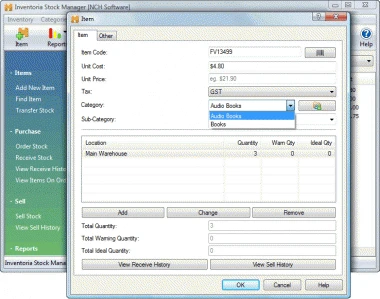
Create purchase orders and email directly to vendors
Maintain a database of customers and suppliers
Set low-level warnings so you know when to reorder
Update item quantities when orders are received
Inventory Reporting
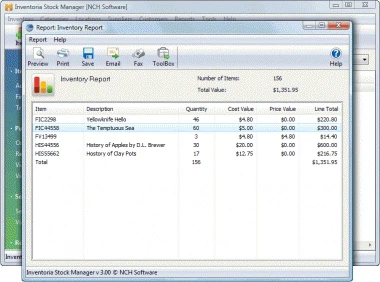
Monitor and report stock levels, costs and averages
View inventory levels by location, category or overall
Product history shows when items were received or sold
Item Control
Import current inventory with a .csv file
Scan in barcodes to add new items
Add notes, URLs and photos to item descriptions
Group items into categories for organized stock control
Set sales units for items sold by weight or in bundles
Integrates with other business programs to maintain inventory data across all aspects of your business
Manage Users and Locations
Transfer stock between locations
Web access allows users in different locations to log in
Assign appropriate access levels to different users
Mobile access to the program through the web interface
(e.g., iPhone, Android)
Manage multiple businesses simultaneously


