|
|
List Price: $59.90 $29.95 50% Off Discount: -$29.95 Coupon code: BEST-ARBJ-QYDP Note: When you click "Buy Now" the coupon is added to your cart automatically Shipping: Send Register Code by E-mail (Free) |
Buy Now Free Trial  |
System Requirements:
Platform: Windows 95/98/ME, NT/2000, XP, Vista, Windows 7, Windows 8
Log File Viewer Standard is an efficient and easy-to-use tool for browsing, searching, filtering and monitoring log files of any format.
- Support any log format (customize parser)
- Support large log files of any size
- Easy to use and flexible searching, filtering, highlighting functions
- Monitor logs in real-time without reload
- Support both head & tail loading-mode
- Auto-identify different encoding log files
- Ability to select / copy any column and rows
- Export any lines or entire file to CSV file
Highlight Features
- Support any log format (customize parser)
- Support large log files of any size
- Easy to use and flexible searching, filtering, highlighting functions
- Monitor logs in real-time without reload
- Support both head & tail loading-mode
- Auto-identify different encoding log files
- Ability to select / copy any column and rows
- Export any lines or entire file to CSV file
Support both head & tail loading-mode
When open a log file, it is displayed from tail in default. But you can switch to head loading-mode in the options dialog.
Auto-identify different encoding log files
Log File Viewer Standard auto-analyzes the log file and displays the contents with a proper encoding (ANSI, OEM, UTF-8, Unicode LE/BE etc). If the log file doesnt have a BOM signature, the ANSI encoding will be used as default, but you can change it manually.
Support any log format (customize parser)
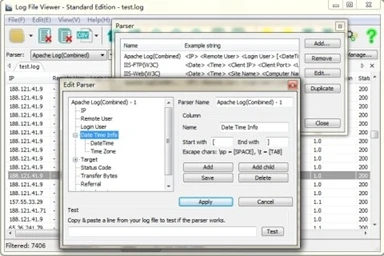
Log File Viewer Standard has an advanced parser management tool in order to read any log format. There are some preset parsers, but you can easily create new parsers for specified formats. LFV-STD auto-detects the file to choose the proper parser, you don't have to select it manually every time when open a log file.
If LFV-STD doesn't find a suitable parser for a file, all the file contents will be shown in one column; while searching, filter, highlighting and other main functions are still available.
Support large log files of any size
Log File Viewer Standard can handle large log files of any size (from 100MB to several gigabytes) in a quite user friendly way.
Quickly search anything in log files
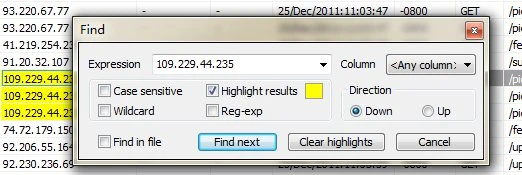
You can search with a keyword or matching patterns (wildcard or regular expression) in a selected column or any columns.
You can browse the result one by one or highlight all the search results.
The search direction can be changed (up or down).
Easy and flexible filter function
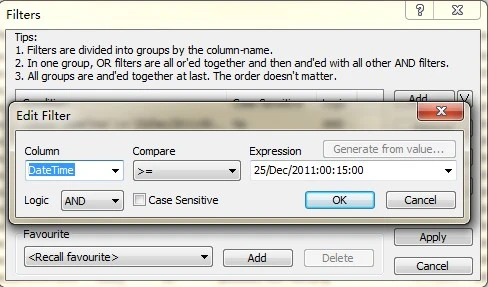
You can filter the log file with one or more matching conditions. Each condition can be created with flexible matching patterns (is, is not, contains, excludes, wildcard or regular expression).
10 recently used conditions will be stored in history records.
Frequently used filters (sets of matching conditions) can be saved as your favorites.
There are also some quick filter operations.
Customizable highlighting function
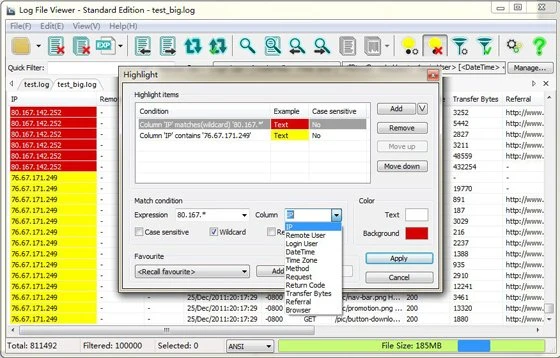
Log File Viewer Standard enables you to specify a set of highlighting rules. Each highlighting rule can be created with a keyword or matching patterns (wildcard or regular expression), applied in a selected column or the whole file. And any content which matches a given highlighting rule will have a customized highlight-effect.
10 recently used highlighting rules will be stored in history records.
Frequently used highlighting rules can be saved as your favorites.
Monitor logs in real-time without reload
When auto-refresh mode is turned on, Log File Viewer Standard will append the new contents at bottom of the list as soon as the log file contents increased. All current filter and highlighting commands will be applied automatically.
Ability to select / copy any column and rows
You can select/copy any parts of file contents in column or rows, choosing space or tab as the separator character between columns in the options dialog.
Export any lines or entire file to CSV file