
|
|
Price: | $49.95 $39.96 20% OFF |
Buy Now
|
| Discount: | -$9.99 | ||
| Coupon Code: | BEST-FTNI-WSNQ | ||
| Sales for: | Global *USD$ is default, select other currencies at the order page | ||
| Note: | When you click "Buy Now" the coupon is added to your cart automatically | ||
|
Shipping:
|
Send Register Code by E-mail, that containing the download URL (Free)
More shipping requirement, please see in order page |
|
|
| 100% Purchase Secure & 30 Days Money Back Guarantee! |
|
||
| Product Details | User Guide | Add Comments | |||



| Platforms: | Mac OS X Mountain Lion 10.8, Lion 10.7, 10.6 Snow Leopard |
| Processor: | Intel, Power PC (G4 or later) |
| RAM: | 256 MB RAM (512 MB or above recommended) |
| Disk Space: | 5.5 MB free hard disk space for installation |
| Language: | English |
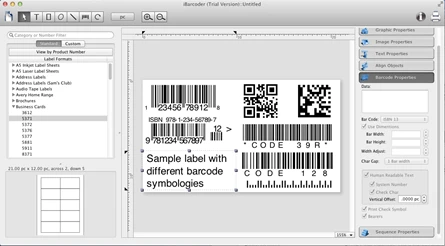 Generate Barcodes on Mac easily with iBarcoder - mac barcode maker.
Whether you are a small, mid-size, or large-scale organization, our mac barcode generator will easily create any number of colorful barcode labels in your own style, of any size, or shape. There's no need to spend money for purchasing costly barcode stickers for your business! Use iBarcoder to design and print barcode labels, stickers, tags on your mac with a few mouse clicks. Also you can use this mac barcode software as Datamatrix and QR Code generator. Create best barcode graphics for retail packages, books, stickers, and more.
Print with Inkjet, Laser, Direct Thermal or any other special barcode printers. Barcode images created by Mac Barcode Generator are 100% Scannable with any Stationary, Cabled or Wireless Scanners.
Smart, intuitive mac barcode generating software
Create professional barcoded labels with a few mouse clicks,
Live preview feature: start typing to create your barcode,
Modify your mac barcode by changing types, sizes and other attributes intrinsic to a certain barcode symbology, advanced tools make customizing your barcode easy,
Rotate generated barcode image,
Support barcode preview functionality,
Print barcodes directly to your printer using standard Avery label formats provided,
Create and save your own custom label formats,
Export barcode as a high-resolution (up to 4800 dpi) mac image file, or vector graphic,
PDF (vector), EPS (vector), BMP, TIFF, JPEG, PNG, PNTG, Photoshop and more...
Make the desired barcode Font and Color settings,
Copy, then paste finished graphics right to Adobe Illustrator, InDesign, Photoshop, or other software from mac clipboard.
Add text, borders, images, and more
Add various objects and design elements like text boxes, image boxes, rectangles, ovals and lines to your labels. Type in the necessary text, insert the desired images, logos, illustrations to create the professional barcode labels for commercial use.
Sequential barcodes for catalogs and retail operations
The powerful Sequential Numbers feature allows you to define the sequence in which barcodes are printed or exported. The barcode sequences can be created in two modes. The Counter mode creates the next barcode automatically constructing the next barcode data string from user defined prefix, starting number and postix parts using the increment value. The Text File mode allows to select a file containing a set of data strings for generating sequential barcodes. This can be either a text (.txt) file, or an Excel Workbook file.
Features:
| Design Features True WYSIWYG editor High Precision On-Screen Display Full color editor Multiple Objects Selection Label Printing control Custom Label format support Undo/Redo Concurrent Object Properties update Concurrent Barcode Properties update Graphics import in different formats Metric and US Measurement Systems Label Format Preview Text Full Text Options Autowrap Fitting Text Rotation Wrapping Rich Text Support Paragraph Support Graphics Vector Graphics Image rotation Export Image options Scale Image in object Design Objects Rectangle Ellipse Line Border Specification Border Thickness Specification Rotation Combine text and image Fill/Stroke Color Specification Transparency Barcode Support Industry standard adherence Precise bar width specification Stretchable Bar Width specification Advanced Serialization Sequentially Numbered Bar Codes Human readable text options Automatic Check Digit Readable Text Formatting |
Counter and Serialization Serialized text and barcode objects Numeric counter Prefix and suffix options Start and Step Options Padding options Start Value from Prompt File Minimum and Maximum specification Show text only options FIM Bars FIM A FIM B FIM C Barcodes Supported CODE 128 CODE 39 CODE 93 CODE 11 EAN 13 EAN 8 ISBN ISSN ISMN UPCA UPCE GS1-128 GS1-Databar GS1-Databar Stacked POSTNET PLANET CODABAR ITF14 MSI HOR BARS INTERLEAVED 2 OF 5 JAPANPOST PHARMACODE INTELLIGENT MAIL DATAMATRIX QR CODE GS1-Databar Stacked Omnidirectional GS1-Databar Limited |
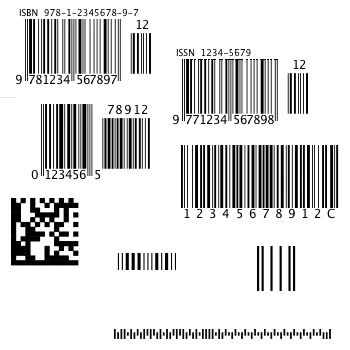
Mac barcode generator supports the following barcode symbologies
| Postnet PLANET Japanpost customer mac barcode FIM Codes (3 types) Horizontal bars UPC barcode UPC A (2 or 5 digit supplements allowed) UPC E (2 or 5 digit supplements allowed) EAN barcode EAN 13 (2 or 5 digit supplements allowed) EAN 8 (2 or 5 digit supplements allowed) ISBN barcode ( How to make ISBN barcode ) ISBN-13 ISBN-10 ISBN (2 digit supplements allowed) ISBN (5 digit supplements allowed) ISMN ( How to make ISMN barcode ) ISSN (2 or 5 digit barcode supplements allowed) Code 128 Code 128 Code 128 A Code 128 B Code 128 C Codabar ITF14 Code 39 Code 11 Code 93 MSI mac barcode Interleaved 2 of 5 Datamatrix Intelligent Mail Barcode Pharmacode QR Code ( How to make QR Code barcode ) ( How to make QR Code with Logo ) Micro QR code GS1-128 GS1-Databar GS1-Databar Stacked GS1-Databar Stacked Omnidirectional GS1-Databar Limited |
 |
Mac barcode history and specification ( from wikipedia.org )
Barcode is method of automatic identification and data collection. The first patent for a barcode type product (US Patent #2,612,994) was issued to inventors Joseph Woodland and Bernard Silver on October 7, 1952.
The UPC encodes 12 decimal digits as SLLLLLLMRRRRRRE, where S (start) and E (end) are the bit pattern 101, M (middle) is the bit pattern 01010 (called guard bars), and each L (left) and R (right) are digits, each one represented by a seven-bit code. The UPC has only numerals, with no letters or other characters.
The International Standard Book Number (ISBN barcode) is a unique numeric commercial book identifier based upon the 9-digit Standard Book Numbering (SBN) code created by Gordon Foster. The 10-digit ISBN format was developed by the International Organization for Standardization and was published in 1970. Since 1 January 2007, ISBN have contained 13 digits, a format that is compatible with Bookland EAN-13.
Code 128 includes 107 symbols: 103 data symbols, 3 start codes, and 1 stop code. To represent all 128 ASCII values, there are three code sets ( Code 128 A, Code 128 B, Code 128 C), which can be mixed within a single barcode (by using codes 103, 104, 105 to switch between them).
A QR Code is a matrix barcode (or two-dimensional code). Common in Japan, where QR Code was created by Toyota subsidiary Denso-Wave in 1994, the QR code is one of the most popular types of two-dimensional barcodes. QR Codes storing addresses and URLs may appear in magazines, on signs, buses, business cards, or on just about any object about which users might need information. Logos and other images can be added to QR Codes in iBarcoder easily. Opacity, scale and other settings can be applied to the logo.
A Micro QR Code is a very small QR Code that fits applications that require a smaller space and use smaller amounts of data, such as ID of printed circuit boards and electronics parts, etc. A major Micro QR Code feature is it has only one position detection pattern, compared with regular QR Code that require a certain amount of area because position detection patterns are located at the three corners of a symbol.
The International Standard Music Number or ISMN barcode is a thirteen-character alphanumeric identifier for printed music developed by ISO. The ISMN barcode is a unique number for the identification of all notated music publications from all over the world, available for sale, hire or gratis, a score, or an element in a multi-media kit. The ISMN barcode is designed to rationalize the processing and handling of notated music and the respective bibliographical data for publishing houses, the music trade and libraries.
You are able to save your label as either Barcoder, PDF or EPS files, and export generated mac barcode objects in numerous image formats.
iBarcoder basic operations
shows the actions to be done to create a label from scratch.
adding a barcode object to your label,
editing the barcode data,
resizing the barcode object, and
changing the width adjust and Text Vertical Offset settings.
Sequential barcodes from Excel workbook file
shows how to set a sequential data from Excel file to a barcode object.
adding a QR Code barcode object to your label,
switching on the Serialize option for the object,
opening an Excel workbook file for importing data,
switching between sheets and cells, and
printing sequential QR Codes.


