
|
|
Price: | $39.95 $31.96 20% OFF |
Buy Now
|
| Discount: | -$7.99 | ||
| Coupon Code: | BEST-FTNI-WSNQ | ||
| Sales for: | Global *USD$ is default, select other currencies at the order page | ||
| Note: | When you click "Buy Now" the coupon is added to your cart automatically | ||
|
Shipping:
|
Send Register Code by E-mail, that containing the download URL (Free)
More shipping requirement, please see in order page |
|
|
| 100% Purchase Secure & 30 Days Money Back Guarantee! |
|
||
| Product Details | User Guide | Add Comments | |||



| Platforms: | Windows 98/XP/Vista/7 |
| Processor: | 750 MHz Intel, AMD CPU or above |
| RAM: | 256 MB RAM (512 MB or above recommended) |
| Disk Space: | 12 MB free hard disk space for installation |
| Language: | English |
 Create barcode with Cristallight Barcode Generator easily.
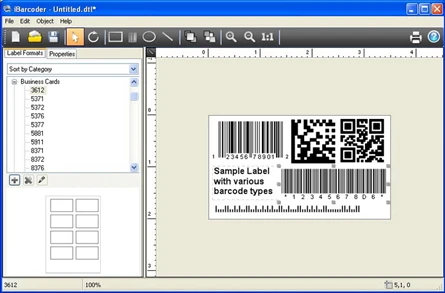
The program is a PC barcode generator which helps you to create many types of barcodes, text and shape objects, print them on any of the standard label paper templates provided or make custom label format. Other objects, like text and graphics can be added to your windows labels, thus making them competing with those created by most of labeling products.
A generated barcode on the page adjusts immediately to reflect any changes you make in the barcode specifications data you've entered into the Barcode Info Panel. Width, height, human readable text options, etc. allow easy customization of the PC barcodes created with windows barcode application. Also you can use this barcode software as PC Datamatrix and QR Code generator.
Add text, borders, images, and more
Add various objects and design elements like text boxes, image boxes, rectangles, ovals and lines to your labels. Type in the necessary text, insert the desired images, logos, illustrations to create the professional barcode labels for commercial use.
Sequential windows barcodes for catalogs and retail operations
The powerful Sequential Numbers feature allows you to define the sequence in which barcodes are printed or exported. The barcode sequences can be created in two modes. The Counter mode creates the next barcode automatically constructing the next barcode data string from user defined prefix, starting number and postix parts using the increment value. The Text File mode allows select a file containing the set of data strings to generate barcodes from.
PC barcode generator supports the following barcode symbologies:
Postnet,
Japanpost customer barcode,
FIM Codes (3 types),
Horizontal bars,
UPC barcode
UPC A (2 or 5 digit supplements allowed)
UPC E (2 or 5 digit supplements allowed)
EAN barcode
EAN 13 (2 or 5 digit supplements allowed)
EAN 8 (2 or 5 digit supplements allowed)
ISBN barcode
ISBN
ISBN with 2 digits supplement
ISBN with 5 digits supplement
ISSN barcode,
ISSN
ISSN with 2 digits supplement
ISSN with 5 digits supplement
ISMN barcode,
ISMN
ISMN with 2 digits supplement
ISMN with 5 digits supplement
Code 128,
Codabar,
ITF14,
Code 39,
Code 11,
Code 93,
MSI, and
Interleaved 2 of 5.
Datamatrix
Intelligent Mail Barcode
Pharmacode
QR Code
Export PC barcode objects in six image formats:
BMP, GIF, JPEG, TIFF, PNG, EMF
What is QR code?
They come to us from Japan. QR is short for Quick Response. QR Codes are used to take a piece of information from a transitory media. You may see QR Codes in a magazine advert, on a billboard, a web page or even on someone's t-shirt.
The reason why they are more useful than a standard PC barcode is that they qr code store much more data (up to 7,089 characters can be encoded in one symbol), including url links, geo coordinates, symbols, binary, and control codes. The other key feature of QR Codes is that instead of requiring a chunky hand-held scanner to scan them, many modern cell phones can scan them.
QR Code contains information in both the vertical and horizontal directions. QR Code has error correction capability. Data can be restored even if the symbol is partially dirty or damaged.
iBarcoder Frequently Asked Questions (PDF 212 KB)


